1
of
4
Loading...
LG LT700P Compatible Replacement Fridge Filter by Neo-Pure
Part Number:
NP-LT700P
Alt. Part Number:
ADQ36006101, LT700P
Regular price
$22.68
Unit price
Unit price
/
Unavailable
Couldn't load pickup availability
Shipping Information
Shipping Information
Shipping costs are based on your order’s weight, location, and selected shipping option. We strive to ship orders quickly, with expedited orders (Next Day Air or 2 Day) going out the same business day if placed before 4:30PM EST.
Description
Description
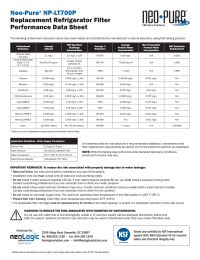
The latest Neo-Pure NP-LT700P refrigerator water filter is designed to replace the LG LT700P model. This new filter is much more affordable, while still maintaining the utmost quality standards of drinking water. The NP-LT700P surpasses reduction standards set forth by NSF International for toxins and harmful chemicals. The activated carbon core captures microscopic impurities via adsorption, sequestering chlorine, solid particles including dirt and rust, asbestos, and parasites. Furthermore, the carbon is made out of charred coconut shell, which is a much more natural and environmentally-friendly alternative to coal. The submicron formula of the two-stage filtration process will leave the water and ice from your refrigerator safer and better-tasting.
Features:
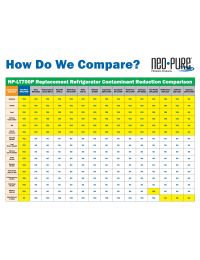
Reduces Harmful ContaminantsTested against international standards for the reduction of chlorine, asbestos and parasites.
100% Fit GauranteeThe NP-LT700P has been designed for 100% leak-free fit in your LG refrigerator.
Instructions for Use
Per manufacturer recommendations, your filter should be replaced every six months or 200 gallons. The indicator light on your refrigerator is timed to remind you to change your filter, and should be minded for optimal performance.
1. Locate the water shut-off valve, which is located behind your refrigerator. Turn the valve to turn off water to the fridge.
2. Locate and remove your old refrigerator water filter inside your refrigerator. On most models, this will be found in the upper-left corner of your fridge.
3. Remove the top left shelf, as it will prevent you from being able to open the filter older all the way.
4. Open the filter holder by pressing the “PUSH” button. Gently guide the holder door open.
5. Pivot the old filter downward. Firmly grasp, and pull to remove from the holder. Discard the old filter.
6. Unwrap the NP-LT700P from the packaging, and align the tabs on the filter with the inserts in the filter holder.
7. Insert the new filter into the holder, pushing to secure. Return the filter holder door tray to the closed position.
8. Turn the water to the refrigerator back on, and return refrigerator into place.
9. Reset the filter indicator light by pushing the reset button for 3 seconds.
10. Flush the new filter by running water through the dispenser for 5 minutes. This can be done in increments of 30 seconds to prevent sputtering.
Note: For a comprehensive compatibility list please look to the bottom of this page.
Features:
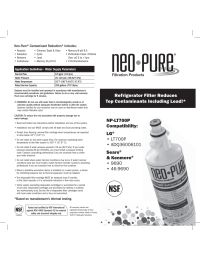
- Guaranteed Compatibility with the LG LT700P, backed by a manufacturer 100% fit-guarantee.
- Over 97% Reduction of chlorine, dirt and rust, parasites and asbestos.
- Environmentally-Friendly coconut shell carbon core.
- Detoxifies Tap Water via advanced two-stage filtration.
Reduces Harmful ContaminantsTested against international standards for the reduction of chlorine, asbestos and parasites.
100% Fit GauranteeThe NP-LT700P has been designed for 100% leak-free fit in your LG refrigerator.
Instructions for Use
Per manufacturer recommendations, your filter should be replaced every six months or 200 gallons. The indicator light on your refrigerator is timed to remind you to change your filter, and should be minded for optimal performance.
1. Locate the water shut-off valve, which is located behind your refrigerator. Turn the valve to turn off water to the fridge.
2. Locate and remove your old refrigerator water filter inside your refrigerator. On most models, this will be found in the upper-left corner of your fridge.
3. Remove the top left shelf, as it will prevent you from being able to open the filter older all the way.
4. Open the filter holder by pressing the “PUSH” button. Gently guide the holder door open.
5. Pivot the old filter downward. Firmly grasp, and pull to remove from the holder. Discard the old filter.
6. Unwrap the NP-LT700P from the packaging, and align the tabs on the filter with the inserts in the filter holder.
7. Insert the new filter into the holder, pushing to secure. Return the filter holder door tray to the closed position.
8. Turn the water to the refrigerator back on, and return refrigerator into place.
9. Reset the filter indicator light by pushing the reset button for 3 seconds.
10. Flush the new filter by running water through the dispenser for 5 minutes. This can be done in increments of 30 seconds to prevent sputtering.
Note: For a comprehensive compatibility list please look to the bottom of this page.
Specifications
Specifications
Downloads
Downloads
Reviews (2)
Reviews (2)

Safe & Secure Checkout
Enjoy a Safe & Secure Checkout with advanced encryption and trusted payment gateways, ensuring your information stays protected every step of the way.